
How to Calibrate a Ram Speedometer for Larger Tires
To calibrate a Ram speedometer for larger tires, you usually update the tire-size or tire-circumference configuration with AlfaOBD, Tazer RAM, or a compatible handheld calibration tool. Many 2018+ FCA/Ram platforms use a Security Gateway Module (SGW/SGM) that can block aftermarket write commands unless you use an authorized access method or a compatible bypass. Installing taller tires makes the speedometer read slower than your actual speed, leading to incorrect odometer records and odd shift behavior.
Key Takeaways
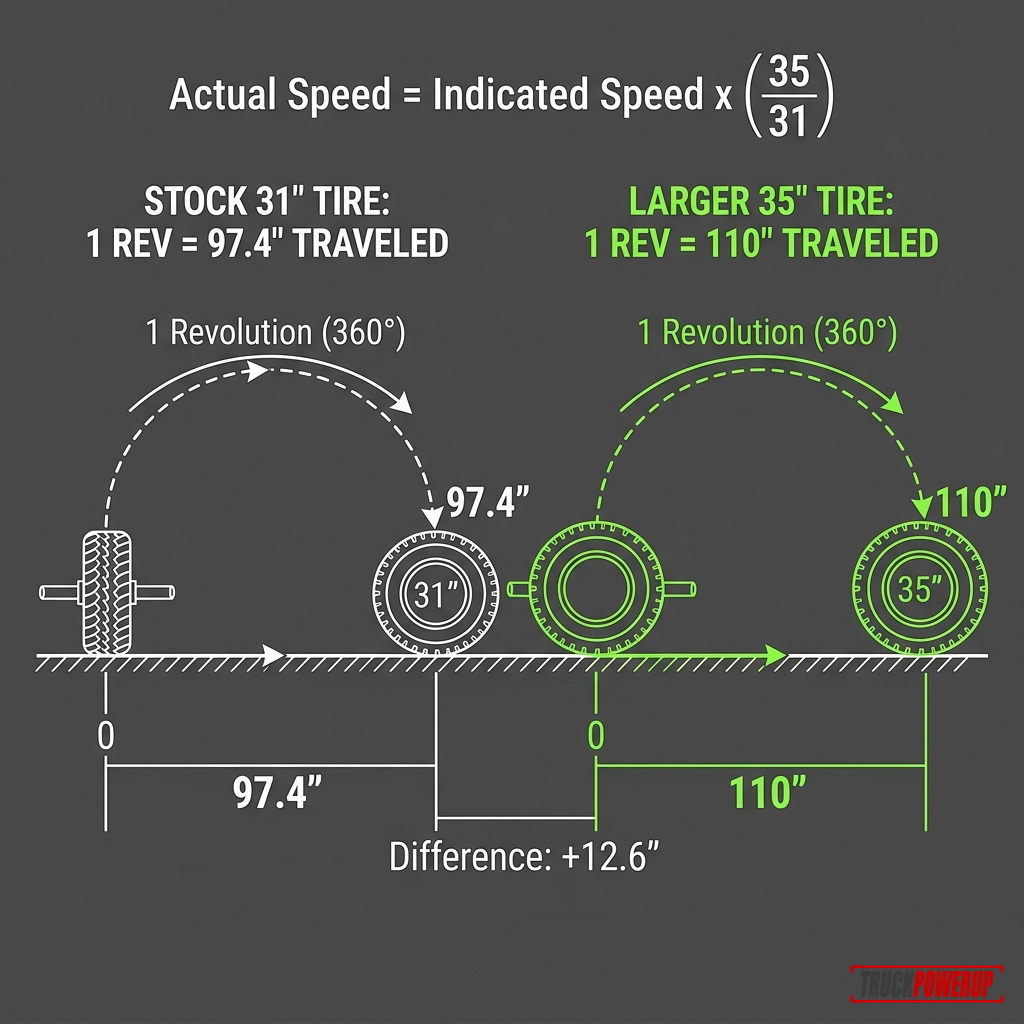
- Taller tires roll farther per revolution, which causes the dashboard speedometer to display a speed lower than your actual road speed.
- Most 2018+ FCA/Ram platforms use a Security Gateway Module (SGW/SGM) firewall that can block writing calibration data through the OBD-II port unless the tool has authorized access or a compatible bypass.
- AlfaOBD is an enthusiast-favorite software tool that allows you to change tire parameters in the BCM on a PC or Android device.
- Tazer RAM by ZAutomotive provides a physical, menu-driven module that plugs into the OBD-II port to make live tire adjustments.
- Uncalibrated tires cause late shifts or gear hunting in Ram's 8-speed TorqFlite transmissions due to mismatched wheel speed averages.
- Verify the calibrated speedometer output against a digital GPS speed app at steady highway speeds.
Quick Answer
To calibrate a Ram truck’s speedometer:
- Determine the factory stock tire height from your tire placard on the driver’s door jamb.
- Measure your new tire’s actual loaded rolling height (distance from ground to center hub 2).
- If your truck has an SGW: Use a compatible Chrysler/Ram 12+8 bypass cable or an authorized diagnostic-access method before attempting to write changes.
- Choose your programming tool: AlfaOBD (diagnostic software), Tazer RAM (plug-in module), or a handheld programmer.
- Update the BCM’s tire circumference or tire size parameter.
- Follow your tool’s post-write reset procedure, which may include a BCM, RF Hub, or full module reset depending on year and body style.
- Test the speed display against a GPS speed reading at 30, 50, and 70 mph.
| Stock Size | New Tire Size | Speedometer Shift | Actual Speed at 70 mph Display |
|---|---|---|---|
| 31.1 in (265/70R17) | 33 in (285/70R17) | Reads 6.1% slow | About 74.3 mph |
| 32.1 in (275/60R20) | 35 in (35x12.50R20) | Reads 9.0% slow | About 76.3 mph |
| 33.0 in (275/65R20) | 35 in (35x12.50R20) | Reads 6.1% slow | About 74.3 mph |
| 33.0 in (275/65R20) | 37 in (37x12.50R20) | Reads 12.1% slow | About 78.5 mph |
Note: Tire brands differ. A nominal “35-inch” mud tire typically measures between 34.0 and 34.7 inches when mounted on the truck under load.
Why Bigger Tires Disrupt a Ram’s Electronics
Your Ram’s computer calculates vehicle speed using factory parameters for gear ratios and tire circumference. Taller tires cover more distance per wheel revolution:
Actual speed = indicated speed x (new tire diameter / old tire diameter)If your speedometer is uncalibrated after switching from 32.1-inch stock tires to 35-inch tires:
70 mph indicated x (35.0 / 32.1) = 76.3 mph actual speedThis speed discrepancy affects other vehicle systems:
- Transmission Shift Logic: Ram’s 8-speed TorqFlite transmissions use speed-related inputs to coordinate shift scheduling. A large tire-size mismatch can contribute to odd shift behavior, especially when actual road speed no longer lines up with the tire configuration stored in the truck.
- ABS and Electronic Stability Control (ESC): Ram’s safety modules compare individual wheel speed sensor data with engine torque and steering angles. Mismatched calibrations can trigger false traction control interventions.
- Odometer Integrity: Running 35s on a stock 32-inch calibration means your odometer undercounts your actual mileage by roughly 9%, which also deflates your fuel economy calculations.
According to Superchips, running uncalibrated larger tires directly degrades automatic transmission shift timing and torque converter lock-up performance: Superchips Flashcal.
The Mechanics of Speed Sensors, Transmission Shift Logic, and Calibration Math
To understand why Ram trucks are sensitive to tire size changes, we must look at how the speed signal moves through Stellantis vehicle networks.
1. Signal Flow: From Wheel Hubs to BCM
On older Dodge Ram trucks (e.g., 3rd Gen 2002–2008), the speedometer read a signal from the rear differential speed sensor.
On modern Ram trucks (4th Gen 2009–2018 and 5th Gen 2019+), the process is digitalized:
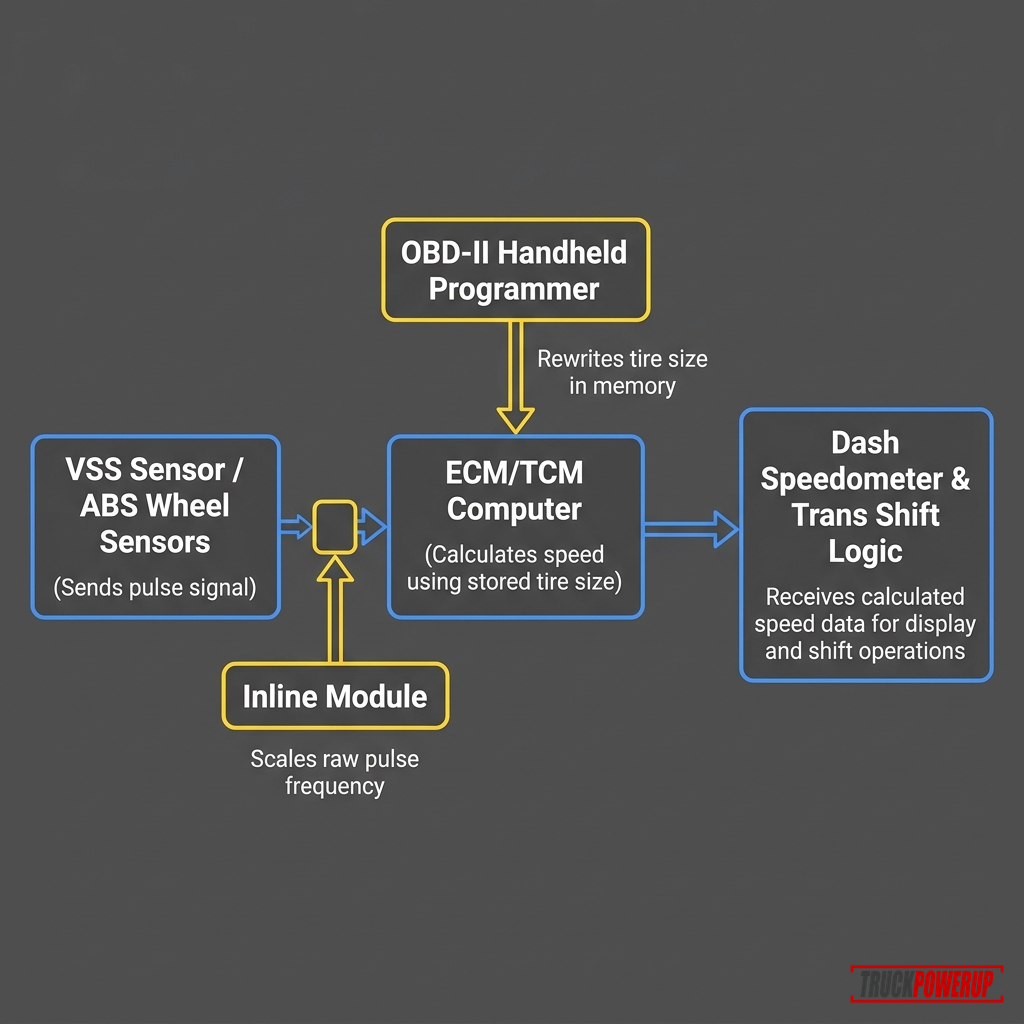
- The Wheel Speed Sensors (WSS) at each wheel hub generate raw magnetic pulses.
- The Anti-Lock Brake System (ABS) module reads these pulses, averages the front and rear wheel speeds, and calculates a central vehicle speed.
- The ABS module sends this calculated speed constant over the high-speed CAN bus network.
- The Body Control Module (BCM) acts as the central gatekeeper, storing configuration constants (tire circumference and axle gear ratio) in its EEPROM.
- The BCM scales the speed signal based on these configuration constants and distributes the corrected speed to the instrument cluster (EVIC), Powertrain Control Module (PCM), and Transmission Control Module (TCM).
2. The Stellantis Security Gateway (SGW) Barrier
Around the 2018 model year, many FCA vehicles gained a Security Gateway Module (SGW or SGM) that limits unauthorized write commands over the OBD-II diagnostic network. Appcar DiagFCA describes the locked SGW as allowing read-only items such as module ID, live data, and DTC reads while blocking actions such as DTC clearing, routines, parameter edits, and flash memory writes: Appcar DiagFCA SGW bypass guide.
The SGW sits physically between the OBD-II port and the vehicle’s interior high-speed and medium-speed CAN buses. Diagnostic tools can still read data (like trouble codes) through the OBD-II port, but if a tool attempts to write configuration changes (such as updating tire size parameters), the SGW blocks the packets. To write changes, you must physically plug a bypass cable in-line directly into the SGW connectors located behind the dashboard.
3. BCM Recalibration vs. Signal Modification
- BCM Write (AlfaOBD / Flashcal): Updates the tire circumference constant in the BCM’s memory. The goal is to keep vehicle modules working from the same updated tire-size configuration.
- Inline Interceptor (Rough Country Calibrator): If you use an inline signal calibrator, it physically intercepts the cluster feed or CAN line and modifies the signal values on the fly to correct the instrument needle.
Measuring Loaded Ram Tire Height
Do not type “35 inches” or “37 inches” into a programmer based only on the tire sidewall. Weight, air pressure, and wheel width all compress the tire tread.
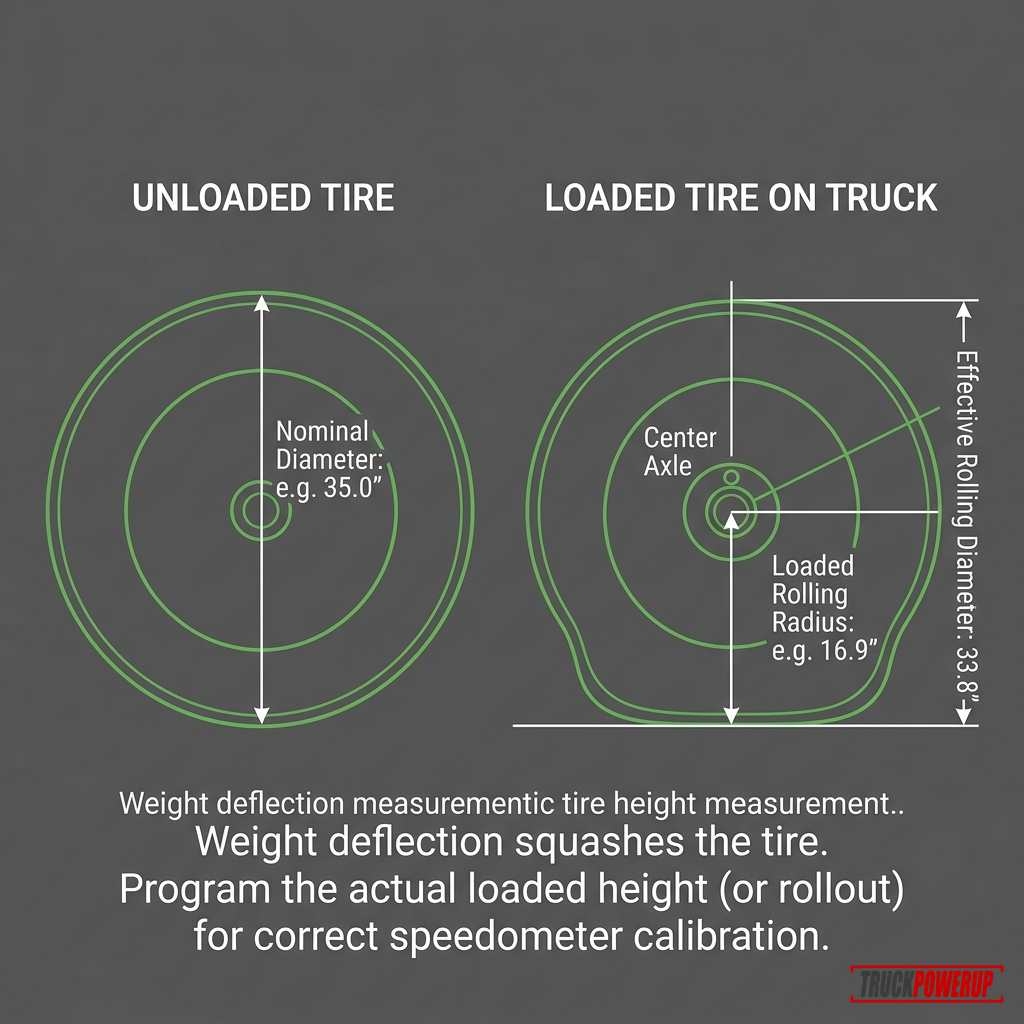
To get an accurate measurement:
- Ensure tires are inflated to your recommended placard pressure.
- Measure from the ground to the center of the wheel axle cap.
- Multiply by 2.
- Input this exact height (usually 34.0–34.4 inches for a nominal 35-inch tire) into your programming tool.
Method 1: The AlfaOBD Software Method
AlfaOBD is dealer-level diagnostic software for FCA vehicles, available for Windows PC and Android devices. It is one of the most powerful and affordable calibration options for Ram trucks.
Equipment Checklist:
- A Windows Laptop or Android Device: To run the AlfaOBD software.
- AlfaOBD Software License: Purchased from alfaobd.com or the Google Play Store.
- High-Quality OBD-II Interface: The OBDLink MX+ Bluetooth adapter is the recommended choice due to its high transfer speed and support for FCA-specific CAN networks.
- Security Gateway Access (If Equipped): Many 2018+ Ram workflows require a 12+8 SGW bypass cable or authorized gateway access before aftermarket tools can write settings. Location and connector style vary by model year and body style.
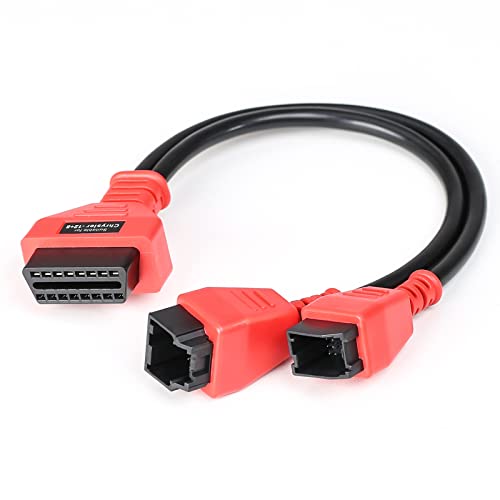
Chrysler 12+8 Security Gateway Bypass Cable
- • Bypasses FCA Security Gateway Module on compatible trucks
- • Useful for many 2018+ Ram calibration workflows
- • 12-pin and 8-pin connector layout
- • Confirm exact year, body style, and SGW location before ordering

OBDLink MX+ OBD2 Bluetooth Scanner
- • Gold-standard diagnostic adapter for AlfaOBD software
- • Supports Bluetooth connection to Windows and Android
- • Fast communication rates prevent programming errors
- • Integrates seamlessly with Ram CAN-bus networks
Step-by-Step AlfaOBD Calibration:
- Install SGW Bypass (2018+ only): Locate the SGW module behind the Uconnect radio screen or above the accelerator pedal bracket. Unplug the factory 12-pin and 8-pin connectors, and plug them into your 12+8 Bypass Cable. Plug the other end of the bypass cable into your OBDLink MX+ scanner. (For pre-2018 trucks, simply plug the OBDLink MX+ directly into your OBD-II port).
- Connect AlfaOBD: Turn the vehicle ignition to RUN (Engine Off). Open AlfaOBD, select Ram as the make, choose Body Computer, select your specific body style/year, and click Connect.
- Edit Tire Size Configuration:
- Go to the Active Diagnostics menu (car icon with an open hood).
- Select Car Configuration Change from the drop-down menu.
- Under the parameter list, search for Tire Circumference.
- Select it, enter your new tire circumference in millimeters (Loaded Height in inches 25.4 3.14159), and select Start.
- Perform a PROXI Alignment or Reboot If Required:
- Some Ram configurations or tool workflows may require a PROXI Alignment or module reboot after BCM changes. AlfaOBD lists Body Computer configuration adjustment and Proxy alignment among its supported features, but the exact workflow depends on the truck and control module: AlfaOBD features.
- In the Active Diagnostics menu, select PROXI Alignment Procedure and click Start. Follow the prompt to cycle the key.
- Reset Related Modules If Your Workflow Calls for It:
- Navigate back to the main connection menu, disconnect from the BCM, and connect to the Radio Frequency Hub (RF Hub).
- If your AlfaOBD guide for your exact year calls for it, run Reset ECU, RF Hub Reset, or the relevant module reset. Do not run extra service functions just because another Ram owner needed them.
- Clear DTCs: Connect to the BCM, ABS, and RF Hub modules, read any trouble codes (which are common after module resets), and clear them. Turn key to OFF, wait 60 seconds, and turn the engine on.
Method 2: Handheld Programmers
If you prefer a physical handheld device with a simplified step-by-step menu instead of a laptop with software, a dedicated OBD-II handheld programmer is an excellent choice.
Recommended Handheld Option: Hypertech Speedometer Calibrator
Hypertech’s handheld speedometer calibrator is a dedicated OBD-II programmer that plugs directly into your Ram’s port. It allows you to enter your exact tire size to correct the speedometer and odometer, and saves your factory stock program for easy recovery. Note that 2018+ trucks still require a Security Gateway (SGW) bypass cable.
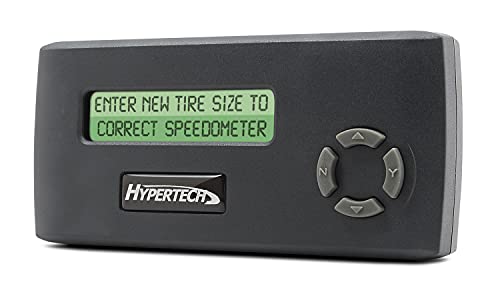
Hypertech Speedometer Calibrator
- • Dedicated speedometer and odometer calibration
- • Supports tire-size and gear-ratio correction on compatible vehicles
- • Saves factory program for easy recovery
- • Confirm exact vehicle compatibility
Dealership Recalibration Limits
A Ram dealership can perform a speedometer recalibration using the official wiTECH diagnostic tool, but they are strictly limited by Stellantis software rules.
A dealer is usually limited to calibration paths supported by Stellantis tooling for your exact VIN and configuration. For example, a factory Rebel or Off-Road Group tire size is more likely to be supported than an aftermarket 35- or 37-inch lifted setup. If the dealer cannot support your tire size, AlfaOBD, Tazer RAM, or an aftermarket programmer may be the practical path.
Speedometer Error & Tire Size Calculator
Enter your stock tire size and your new upsized tire specs in our interactive calculator below to find the exact speed difference and percentage error.
Interactive Tool
Ram Speedometer Error & Tire Calculator
Compare tire sizes to calculate speedometer error, height differences, and look up recommended tire pressure adjustments when switching from passenger (P-metric) to light truck (LT) tires.
Speedometer Impact
Speedometer Reads Slow
When your speedometer reads 60 MPH, your truck's actual speed is 62.1 MPH.
You can also calculate the speed error percentage manually:
Error Percentage = ((New Tire Diameter / Old Tire Diameter) - 1) x 100For instance, replacing a stock 32.1-inch tire (275/60R20) with a 34.6-inch tire (285/65R20):
((34.6 / 32.1) - 1) x 100 = 7.78% Speedometer ErrorAt a displayed speed of 70 mph, your actual vehicle speed is:
70 mph x 1.0778 = 75.4 mph actual speedCommon Programming Pitfalls on Ram Trucks
- Attempting to Program an SGW-Equipped Ram Without Access: The programming write command may fail, or the tool may report a timeout. Check whether your vehicle has an SGW and whether your tool requires a bypass or authenticated access.
- Skipping Required Post-Write Steps: Some tools require a module reset, PROXI alignment, full reboot, or sleep cycles after changing settings. Z Automotive’s Tazer RAM guide, for example, says a full reboot and two sleep cycles are critical after vehicle-setting changes: Tazer RAM user guide.
- Using Low-Quality OBD-II Adapters: Cheap ELM327 Bluetooth clones can suffer from slow data transfer speeds or connection drops during configuration changes. Use a trusted adapter like the OBDLink MX+.
- Tire Size Stacking: If your truck is already custom-tuned (e.g., using HP Tuners or DiabloSport), use that tuning software to update your tire size rather than stacking a handheld calibrator on top.
FAQ
Does AlfaOBD void Ram’s factory warranty?
Altering BCM configurations with AlfaOBD does not void your vehicle’s warranty under the Magnuson-Moss Warranty Act unless the dealer can prove that the change directly caused a mechanical or electrical failure. However, dealerships can overwrite your changes to factory defaults during regular service visits.
Where is the Security Gateway Module (SGW) located on a Ram 1500?
On many SGW-equipped Ram 1500 trucks, the module is found behind the Uconnect radio area or under the driver’s side dashboard, but location varies by model year, cab/body style, and platform. Check the bypass cable instructions for your exact truck before removing trim.
Will larger tires damage my Ram’s 8-speed transmission?
If left uncalibrated, larger tires throw off output shaft speeds, which causes the transmission to upshift too early, cycle the torque converter clutch repeatedly, and hunt for gears under load. Over time, the excessive heat generated by torque converter cycling can shorten transmission life. Calibrating resolves this issue.
Do I need to perform a PROXI Alignment after changing tire size?
Maybe. Some AlfaOBD workflows call for PROXI alignment or a related module reset after BCM configuration changes, while other tools use their own reboot or sleep-cycle process. Follow the procedure for your exact year, body style, and tool.
Related Fitment Guides
Not sure whether recalibrating is enough or you also need new gears? Start with larger tires: recalibrate, regear, or both.
- How to Calibrate a Ford F-150 Speedometer for Larger Tires
- How to calibrate a Chevy speedometer for larger tires
- How to choose the best tire for your pickup truck (Tire Basics)
- Best truck mud tires for daily driving and off-road grip
- Best snow chains for 4x4 trucks
Sources Checked
- AlfaOBD software specifications and parameter guidelines
- Appcar DiagFCA Security Gateway bypass guide
- Z Automotive Tazer RAM instructions portal
- Superchips Flashcal user guides and RAM vehicle compatibility
- Rough Country Speedometer Calibrator user guide
- RAM Trucks owner manuals and technical bulletins
More Featured Guides

How to Calibrate a Ford F-150 Speedometer for Larger Tires
Larger tires throw off your Ford F-150's speedometer, odometer, and automatic transmission shift schedules. Learn how to calibrate using FORScan or handheld programmers.
Read Guide
How to Calibrate a Chevy Speedometer for Larger Tires
Larger tires make many Chevy truck speedometers read low. Learn how to calculate the error, choose a calibration method, and verify the fix.
Read Guide
Gear Ratios and Regearing Larger Tires: The Truck Owner's Math Guide
Learn when larger pickup tires need regearing, how effective axle ratio changes, what ratio restores stock feel, and when speedometer calibration is enough.
Read GuideKelley Crush
Kelley is a mechanical engineer and a truck enthusiast. He's currently an F-250 guy, but he promises to respect any well-equipped and properly utilized truck.