
How to Calibrate a Chevy Speedometer for Larger Tires
To calibrate a Chevy speedometer for larger tires, measure the new tire’s actual diameter, compare it with the stock tire size, then update the truck’s tire-size calibration with a GM-supported dealer flash, handheld calibrator, inline speedometer module, or professional tuning software. Larger tires usually make the speedometer read slower than the truck is actually going. A dash reading of 70 mph can mean 75 mph or more after a jump from stock tires to 35s.
(Note: If you drive a Ford or a Ram, please see our dedicated guides on How to Calibrate a Ford F-150 Speedometer and How to Calibrate a Ram Speedometer.)
Key Takeaways
- Larger tires travel farther per wheel revolution, so the truck can move faster than the speedometer shows.
- Measure actual tire height on the truck instead of trusting the sidewall size. Real diameter changes with tire model, load, pressure, and wear.
- GM dealer recalibration is usually limited to tire sizes GM tested and supported for that exact vehicle application.
- Aftermarket calibrators can correct speedometer and odometer error, and may also help transmission shift timing on supported trucks.
- Any programming tool must match your exact year, model, powertrain, and module setup before you buy it.
- Verify the calibration with GPS at steady highway speeds after the update.
Quick Answer
If your Chevy or GMC truck has larger tires, follow this order:
- Find the stock tire size from the driver-door label or build sheet.
- Measure the new tire’s real loaded diameter.
- Calculate the speedometer error.
- Check whether a GM-supported dealer calibration exists.
- If not, use a compatible handheld or inline calibrator.
- Enter the measured tire height.
- Test against GPS at 30, 50, and 70 mph.
| Tire Change | Approx Speedometer Effect | What 70 mph on the Dash May Mean |
|---|---|---|
| 31 in to 33 in | Reads about 6% low | About 74.5 mph |
| 31 in to 35 in | Reads about 13% low | About 79 mph |
| 32 in to 35 in | Reads about 9% low | About 76.5 mph |
| 33 in to 37 in | Reads about 12% low | About 78.5 mph |
Those are estimates. Real tire diameter is usually smaller than the marketing size, especially once the tire is mounted, loaded, and worn.
Why Bigger Tires Throw Off a Chevy Speedometer
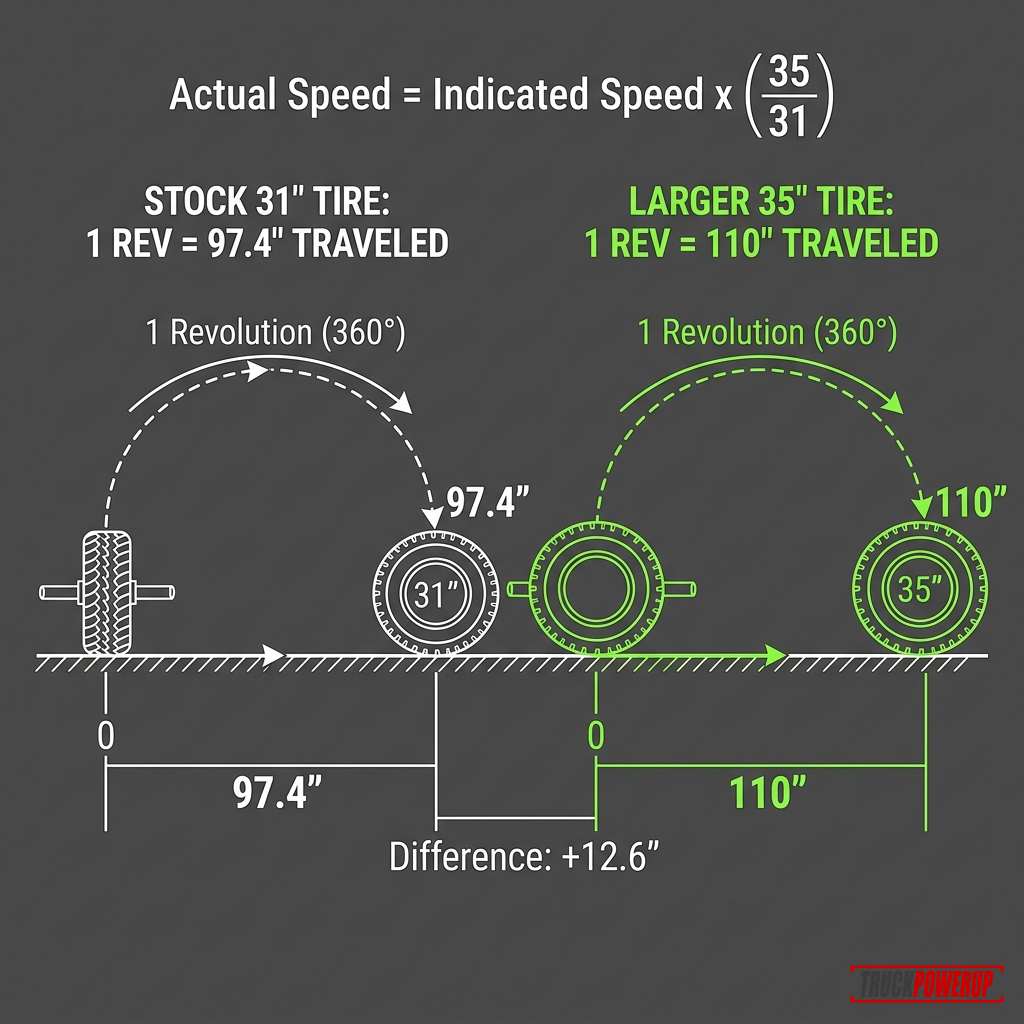
The truck calculates road speed from wheel speed, gear information, and calibration data stored in vehicle modules. When the tire gets taller, one wheel revolution covers more ground. The truck still thinks the old tire is installed unless the calibration is updated.
Use this simple relationship:
Actual speed = indicated speed x (new tire diameter / old tire diameter)Example:
70 mph indicated x (35 / 31) = 79 mph actualThat error affects more than the speedometer. Depending on the truck and transmission, tire-size error can also affect:
- Odometer mileage.
- Transmission shift timing.
- Torque converter behavior.
- ABS and stability-control calculations.
- Cruise-control behavior.
- Fuel economy readings.
- Maintenance interval mileage.
Hypertech explains the same basic problem on its speedometer calibrator page: the vehicle computer calculates speed based on stock tire diameter, so taller or shorter tires can make speedometer readings inaccurate and affect part-throttle shifting: Hypertech Speedometer Calibrator.
The Mechanics of Speed Sensors, Transmission Shift Logic, and Calibration Math
To understand why larger tires disrupt your Chevy truck’s electronics, you have to look at how General Motors vehicles measure vehicle speed and how that speed data is distributed across the vehicle’s network.
1. How GM Trucks Calculate Speed
General Motors has utilized two primary speed-sensing architectures across its pickup and SUV lines:
- Transmission-Mounted Vehicle Speed Sensor (VSS): On classic GM platforms (such as the GMT800 and GMT900 platforms with 4L60E or 4L80E automatic transmissions), vehicle speed is measured directly by a magnetic inductive speed sensor located on the transmission tailshaft housing (for 2WD trucks) or the transfer case output shaft housing (for 4WD models). This sensor reads a 40-tooth reluctor wheel. As the output shaft spins, the reluctor teeth pass the magnetic sensor, generating an AC voltage frequency (Hz) directly proportional to driveshaft RPM. The PCM (Powertrain Control Module) counts these pulses and translates them into MPH using the pre-programmed tire circumference and rear axle gear ratio constants.
- Wheel Speed Sensor (WSS) Averaging: On modern GM platforms (such as the GMTK2XX and GMT1XX, starting around 2014 with 6L80, 8L90, or 10L90 transmissions), vehicle speed calculation is centralized. The Electronic Brake Control Module (EBCM / ABS module) reads high-frequency speed data from magnetic sensor rings on each of the four individual wheel hubs. The EBCM averages these front and rear wheel speeds and transmits the resulting vehicle speed constant over the high-speed CAN bus network to the ECM, TCM, and Instrument Panel Cluster (IPC).
2. Why Shift Schedules Get Disrupted
The automatic transmission in your Chevy truck does not shift based on real road speed; it shifts based on Output Shaft Speed (OSS) and Engine Load (Throttle Position).
When you install taller tires, the tires cover more distance per revolution, meaning the driveshaft and wheel hubs spin fewer times per mile at any given actual vehicle speed. If the computer is not calibrated, the TCM (Transmission Control Module) reads a lower OSS than the truck’s actual road speed. For example, when you are actually traveling at 45 mph, the TCM might think you are only moving 38 mph. This mismatch causes severe drivability bugs:
- Early Upshifting & Engine Lugging: The TCM commands shifts into higher gears (like overdrive) at a lower output shaft RPM relative to throttle position. This drags the engine’s RPM down below its optimal power band, causing the truck to feel sluggish (engine lugging) and triggering spark knock (pinging) under load.
- Torque Converter Clutch (TCC) Cycling: The TCM uses vehicle speed thresholds to lock the torque converter clutch. Because the computer calculates a lower speed, it may delay TCC lockup or cycle the clutch rapidly on and off. This rapid cycling generates massive heat in the automatic transmission fluid (ATF), accelerating transmission wear.
- Delayed Downshifts: To pass another vehicle or climb a hill, you must press the accelerator pedal much deeper than normal to force a downshift because the TCM thinks the vehicle is moving slower and has more torque margin than it actually does.
According to technical guides from Superchips, incorrect speedometer calibration directly affects transmission shift points and torque converter lock-up timing: Superchips Flashcal.
3. How Calibration Intervention Works
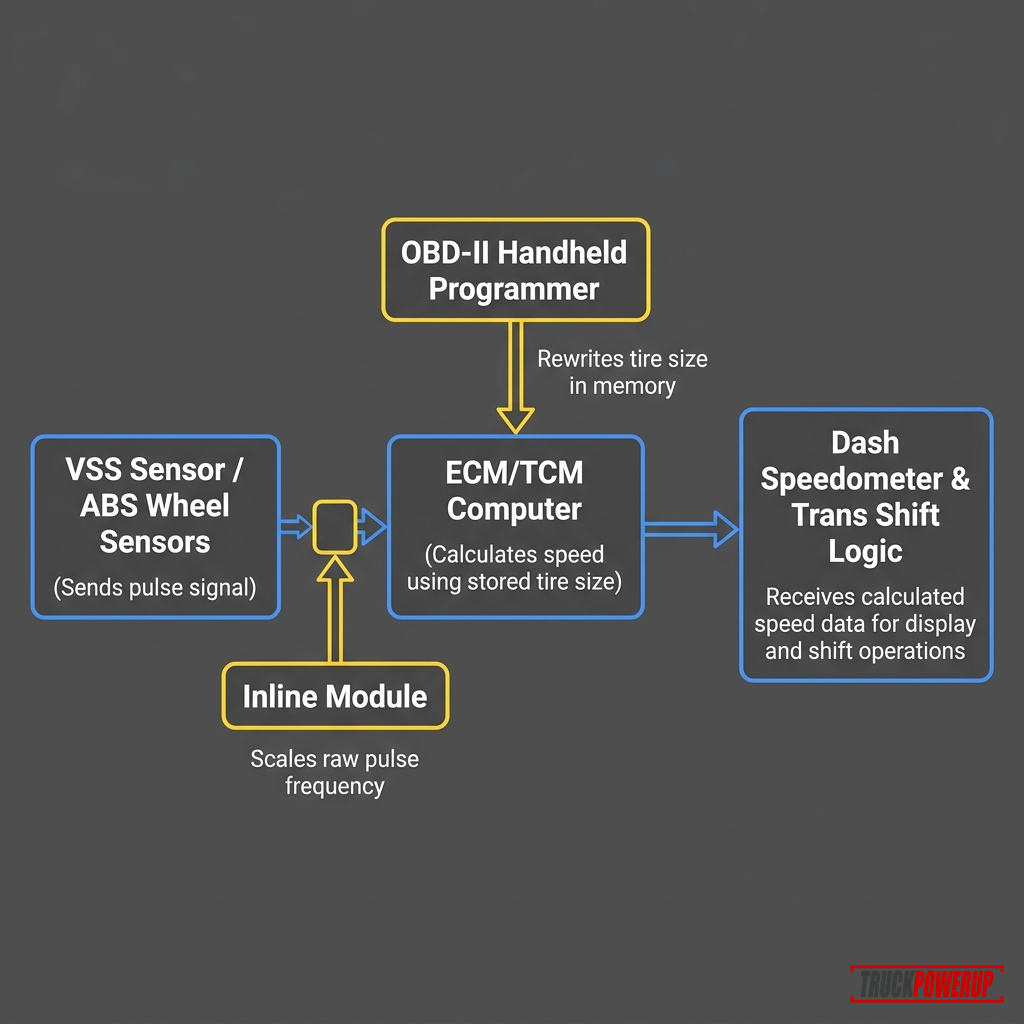
- OBD-II Flash Calibration: Tools like the Hypertech Speedometer Calibrator or Superchips Flashcal plug into the vehicle’s OBD-II diagnostic port. They communicate with the ECM, TCM, and BCM to overwrite the pre-programmed tire-size constant (or tire revolutions-per-mile parameter) stored in the module’s non-volatile EEPROM memory. This restores the accuracy of the internal calculations globally.
- Inline Signal Calibration: On locked vehicle platforms (such as the 2019+ Silverado/Sierra GMT1XX where GM firewalled the ECM/BCM with digital signatures), the modules cannot be flashed via OBD-II. Inline calibrators physically plug in-between the speed sensor wiring harness or cluster. The inline module intercepts the raw pulse signal and electronically multiplies it by the scaling ratio (e.g., multiplying VSS frequency by
1.13for a 13% tire size increase) before sending the corrected signal to the cluster and modules.
Measure the Tire Before Programming
Do not enter “35 inches” just because the sidewall says 35x12.50R20. Many 35s measure closer to 34 to 34.8 inches, and the loaded rolling radius is lower than the unloaded diameter.
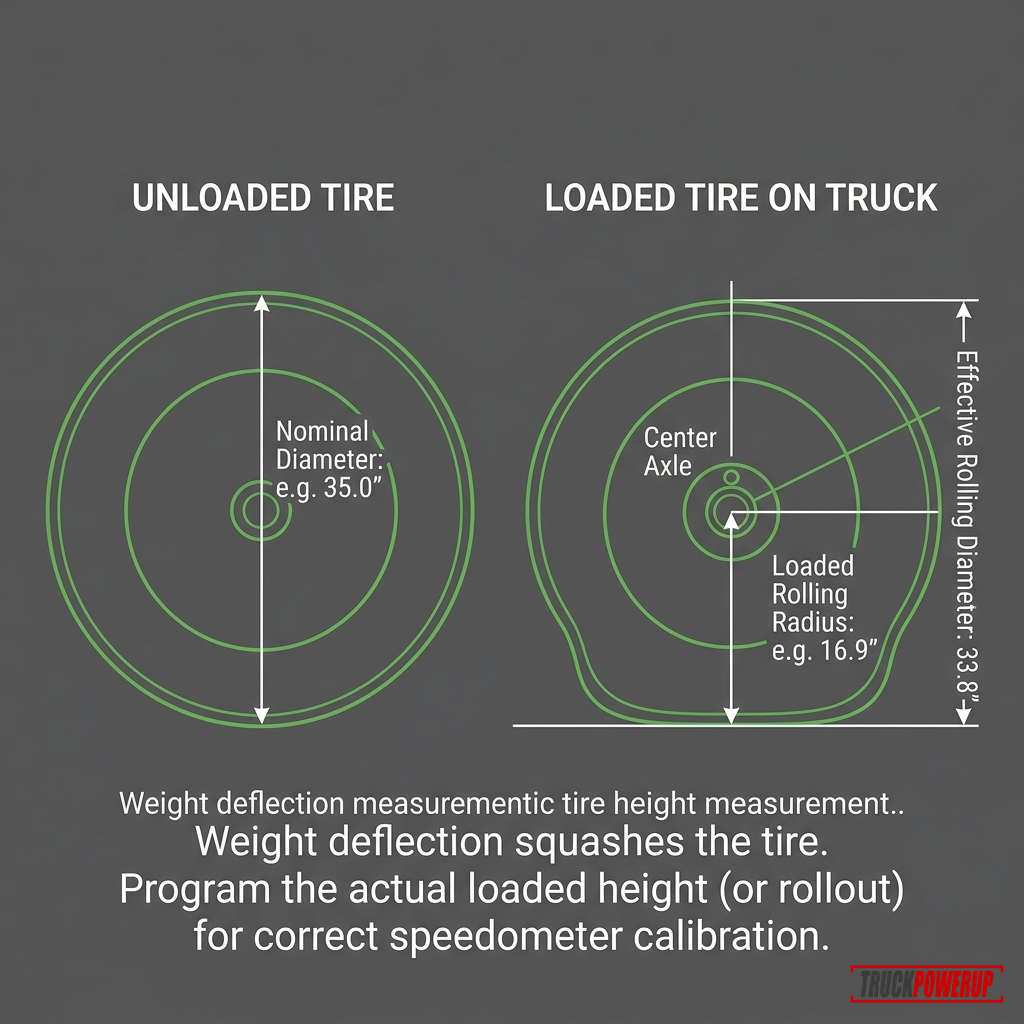
Use one of these methods:
| Method | Best For | How to Do It |
|---|---|---|
| Manufacturer spec | Shopping before install | Check the tire maker’s measured diameter for your exact size |
| Tape-measure diameter | Quick garage estimate | Measure from ground to top of tire with truck on level ground |
| Rollout method | More accurate driveway check | Mark tire and ground, roll one full revolution, measure distance |
| GPS verification | Post-calibration check | Compare steady speed to GPS on a safe straight road |
For the rollout method:
- Inflate the tires to your normal cold pressure.
- Park on flat ground.
- Mark the tire where it touches pavement.
- Mark the pavement at the same spot.
- Roll forward one full tire revolution.
- Mark the pavement again.
- Measure the distance between pavement marks.
- Divide by pi (
3.1416) to estimate rolling diameter.
That number is often better than the advertised tire size for calibration.
Can a Chevy Dealer Recalibrate for Larger Tires?
Sometimes, but do not count on it for non-factory tire sizes.
GM’s service bulletin PIT3271H, published through NHTSA, says General Motors will only support tire calibrations for tires that were sized, tested, and designed for the vehicle application. It also warns technicians not to use the ABS module tire-size selection as a guide for supported tire fitment, because changing ABS tire size data does not necessarily correct the speedometer: GM PIT3271H on NHTSA.
In plain English: if your exact Silverado, Sierra, Colorado, Tahoe, Suburban, or Trail Boss configuration could be ordered from GM with that tire size, a dealer may have a supported calibration. If you installed a lift and 35s that were never a factory-supported combination for that truck, the dealer may decline or have no GM calibration to install.
Calibration Options for Chevy and GMC Trucks
| Method | Best For | Pros | Watch-Outs |
|---|---|---|---|
| GM dealer calibration | Factory-supported wheel/tire sizes | Uses supported GM programming | May not exist for your tire size |
| Handheld calibrator | Many older and late-model gas trucks | OBD-II plug-in, simple tire-height entry | Vehicle coverage is very specific |
| Inline calibrator module | Some newer trucks with locked modules | Can correct speed signal without full tuning | Install and setup vary by year |
| Professional tuning software | Lifted builds, gears, custom setups | More control | Warranty/emissions/module risks |
| GPS-only mental correction | Temporary workaround | No programming | Odometer and shift logic stay wrong |
For a mild tire change, some owners live with the error. For a big jump, especially to 35s or 37s, calibration is worth doing. The truck may feel better, and you are less likely to accidentally speed because the dash is reading low.
Best Speedometer Calibration Tools by Use Case
Best Simple Option: Rough Country Speedometer Calibrator
Best for: Supported Chevy/GMC 1500 and 2500HD trucks after a lift or larger tire install.
Rough Country says its Speedometer Calibrator for Chevy/GMC 1500/2500HD reprograms the vehicle’s speedometer to match larger tires and updates the ECM for shift points and electronic stability control.
Use this if your exact year, drivetrain, and powertrain are listed as compatible. Do not buy by brand alone. Rough Country has multiple calibrator SKUs for different trucks.

Rough Country Speedometer Calibrator for Chevy/GMC Trucks
- • Built for supported Chevy/GMC applications
- • Direct OBD-II communication
- • Corrects speedometer, odometer, and ESC calculations
- • Verify exact year, model, drivetrain, and engine compatibility before ordering
Best Dedicated Speedometer Tool: Hypertech Speedometer Calibrator
Best for: Owners who want speedometer correction without buying a broader performance tuner.
Hypertech’s speedometer calibrator is built around tire-size and gear-ratio correction. Hypertech says it can correct speedometer readings and part-throttle shifting after larger or smaller tires, and it saves the stock program so the vehicle can be returned to stock before service.
This is a good fit if you want a purpose-built tool and your truck is listed in Hypertech’s current application guide.
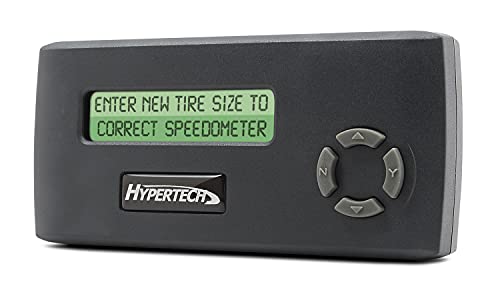
Hypertech Speedometer Calibrator
- • Dedicated speedometer and odometer calibration
- • Supports tire-size and gear-ratio correction on compatible vehicles
- • Saves factory program for easy recovery
- • Confirm exact vehicle compatibility
Best Broader Calibration Tool: Superchips Flashcal for GM Trucks
Best for: Owners who also want related calibration features, diagnostic-code reading, or gear-ratio correction where supported.
Superchips says Flashcal can calibrate for tire-size and gear-ratio changes, and notes that incorrect speedometer calibration can affect shift points and torque converter lock-up: Superchips Flashcal.
This is more than a simple speedometer correction box, so read the coverage list carefully. Some Flashcal part numbers are Jeep-only or platform-specific.

Superchips Flashcal F5 for GM Truck
- • Calibration tool for supported GM truck applications
- • Adjusts shift points and torque converter lockup
- • Corrects speedometer for tire-size and gear-ratio changes
- • Verify vehicle coverage before ordering
How to Calibrate the Speedometer
The exact button sequence depends on the tool, but the workflow is usually similar.
1. Confirm Compatibility
Before buying a calibrator, check:
- Year, make, model, and trim.
- 1500 vs 2500HD vs 3500HD.
- Gas vs diesel.
- 2WD vs 4WD.
- Transmission.
- New body style vs classic body style in changeover years.
- Whether the truck has been tuned already.
- Whether the module needs an unlock or bypass.
If the product page asks for a VIN or vehicle selector, use it.
2. Measure the Tire Height
Use the loaded tire measurement or rollout method. Entering the advertised size may leave the speedometer a little off.
3. Save or Return to Stock First
Many handheld tools store the stock calibration before writing changes. If the truck is already tuned, talk to the tuner or tool manufacturer before stacking changes.
4. Connect the Tool
Most handheld tools plug into the OBD-II port under the dash. Keep the battery charged. Do not unplug the tool halfway through programming.
5. Enter Tire Size
Some tools ask for tire height in inches. Others ask for tire revolutions per mile. Use the format the tool requests.
6. Program the Truck
Follow the prompts. If the tool reports “calibration not found,” update the tool software or contact the manufacturer. Hypertech notes that newer vehicle calibrations may require updating the device online.
7. Verify With GPS
After programming, drive a safe, steady route and compare the speedometer to GPS at several speeds.
| Dash Speed | GPS Check | What to Do |
|---|---|---|
| 30 mph | Within 1 mph | Good enough for most setups |
| 50 mph | Within 1 mph | Good |
| 70 mph | Within 1-2 mph | Usually acceptable; refine if needed |
| Any speed | Off by 3+ mph | Recheck tire measurement and calibration entry |
Speedometer Error Calculator
Compare your stock tire size against your new upsized tires using our interactive calculator below to find the exact speedometer percent error and speed difference.
Interactive Tool
Chevy Speedometer Error & Tire Size Calculator
Compare tire sizes to calculate speedometer error, height differences, and look up recommended tire pressure adjustments when switching from passenger (P-metric) to light truck (LT) tires.
Speedometer Impact
Speedometer Reads Slow
When your speedometer reads 60 MPH, your truck's actual speed is 62.1 MPH.
You can also calculate the error manually using this quick formula:
Percent error = (new tire diameter / old tire diameter - 1) x 100Example for a Chevy truck moving from a 31.6-inch tire to a 34.5-inch tire:
(34.5 / 31.6 - 1) x 100 = 9.2%That means the speedometer reads about 9.2 percent low. At 70 mph indicated:
70 x 1.092 = 76.4 mph actualThe bigger the speed, the bigger the mph difference.
What About Odometer and MPG?
If the truck thinks it is still on smaller tires, the odometer can undercount miles because the truck is traveling farther per wheel revolution than expected. Fuel economy calculations can also look wrong because the truck’s distance data is wrong.
Calibration helps the truck report distance more accurately. It does not remove the real-world fuel penalty from heavier tires, taller tires, wider tread, altered gearing, or aggressive mud-terrain patterns.
If you are still choosing tires, start with pickup truck tire basics before buying a tire size that needs correction.
Bigger Tires Can Affect Shift Feel
Taller tires effectively make the truck’s gearing taller. That can make acceleration feel softer, especially with heavy LT tires or mud-terrains. On automatic trucks, the computer may also be using incorrect speed information for shift scheduling.
This is why a calibrator can feel like more than a speedometer fix. It does not add torque, but it can help the truck make decisions using better tire-size data.
If you are upsizing for off-road traction, read the fitment tradeoffs in best truck mud tires before jumping from stock tires to 35s or 37s.
Common Mistakes
Entering the Sidewall Size Instead of Measured Height
A “35-inch” tire rarely measures exactly 35 inches on the truck. Measure it.
Buying the Wrong Calibrator
Chevy/GMC fitment changes by year, platform, engine, and module setup. A calibrator that works on one Silverado may not work on another.
Ignoring Dealer Calibration Limits
If the tire size was not a supported factory option for your exact truck application, a dealer may not have a GM calibration to install.
Forgetting the Spare Tire
If the spare is still stock size and the truck uses a full-size spare in rotation or emergency 4WD use, plan around that mismatch.
Assuming Calibration Fixes Fitment
Calibration does not fix rubbing, weak load rating, bad offset, gear ratio, brake clearance, or tire weight.
Skipping the GPS Check
The job is not done until the speedometer agrees with GPS closely enough at real driving speeds.
FAQ
Do larger tires make a Chevy speedometer read fast or slow?
Larger tires usually make the speedometer read slow. The truck is traveling farther per wheel revolution than the factory calibration expects.
Do I need to calibrate for 33-inch tires?
It depends on the stock tire size. If the diameter change is only small, the error may be minor. If you moved from a 31-inch tire to a 33-inch tire, the speedometer can be off by around 6 percent.
Do I need to calibrate for 35-inch tires?
Usually, yes. A move from a stock 31- or 32-inch tire to a 35-inch tire can create enough error to affect speed, odometer readings, shift feel, and fuel economy calculations.
Can a Chevy dealer recalibrate my speedometer?
Sometimes. GM generally supports calibrations only for wheel and tire sizes that were tested and designed for that vehicle application. Call with your VIN and planned tire size before assuming the dealer can do it.
Will a speedometer calibrator void my warranty?
It can create warranty questions, especially on newer trucks or tuned vehicles. Talk to the dealer or calibrator manufacturer before programming if warranty coverage matters.
Can I use GPS instead of recalibrating?
GPS can help you estimate real speed, but it does not correct the odometer, transmission logic, or vehicle modules. It is a workaround, not a calibration.
Does changing wheel size matter if tire diameter stays the same?
Not much for speedometer accuracy. The speedometer cares about overall tire diameter or rolling circumference, not rim diameter alone.
Related Tire and Fitment Guides
Not sure whether recalibrating is enough or you also need new gears? Start with larger tires: recalibrate, regear, or both.
- How to Calibrate a Ford F-150 Speedometer for Larger Tires
- How to Calibrate a Ram Speedometer for Larger Tires
- How to choose pickup truck tires
- Best truck mud tires for daily driving and off-road grip
- Best snow chains for 4x4 trucks
- How much weight to add to a truck bed for winter traction
Sources Checked
- GM PIT3271H tire and wheel size calibration bulletin via NHTSA
- GM manuals and guides
- Hypertech Speedometer Calibrator
- Rough Country Speedometer Calibrator for Chevy/GMC
- Superchips Flashcal
More Featured Guides

How to Calibrate a Ford F-150 Speedometer for Larger Tires
Larger tires throw off your Ford F-150's speedometer, odometer, and automatic transmission shift schedules. Learn how to calibrate using FORScan or handheld programmers.
Read Guide
How to Calibrate a Ram Speedometer for Larger Tires
Upsizing tires throws off your Ram truck's speedometer, odometer, and transmission shift points. Learn how to calibrate using AlfaOBD, Tazer RAM, or handheld programmers.
Read Guide
Gear Ratios and Regearing Larger Tires: The Truck Owner's Math Guide
Learn when larger pickup tires need regearing, how effective axle ratio changes, what ratio restores stock feel, and when speedometer calibration is enough.
Read GuideKelley Crush
Kelley is a mechanical engineer and a truck enthusiast. He's currently an F-250 guy, but he promises to respect any well-equipped and properly utilized truck.