
How to Calibrate a Ford F-150 Speedometer for Larger Tires
To calibrate a Ford F-150 speedometer for larger tires, you usually need to update the tire-size or tire-circumference configuration with a compatible diagnostic tool, handheld programmer, or inline speed-signal calibrator. FORScan is the common budget path on supported trucks, but the exact module and accepted tire-size range vary by model year. Upsizing tires makes the speedometer read slower than you are actually driving, which can lead to accidental speeding and odd transmission shift behavior.
Key Takeaways
- Larger tires cover more distance per revolution, meaning the vehicle travels faster than the dashboard speedometer displays.
- Incorrect speedometer calibration on F-150s disrupts the shifting logic of 6-speed (6R80) and 10-speed (10R80) automatic transmissions.
- FORScan is a highly effective, cost-efficient software method to update the BCM tire size parameter on Ford trucks.
- Updating the BCM tire size via FORScan can trigger a powertrain module mismatch code such as P160A or U0422; the fix is usually a module initialization or relearn function, not just clearing codes.
- Aftermarket handheld programmers offer a user-friendly, plug-and-play solution but lock to a single vehicle's VIN.
- Always verify the speedometer correction with a reliable GPS speedometer app at highway speeds after programming.
Quick Answer
For a Ford F-150, the calibration workflow involves:
- Determining the factory stock tire size from the driver’s side door sticker.
- Measuring the new tire’s real loaded height (ground to hub center 2).
- Choosing your calibration method: FORScan (software) or a handheld/inline programmer (hardware).
- If using FORScan: Edit the tire circumference in the BCM, write the changes, and then run the PCM/TCM Module Relearn service function if the truck reports a module mismatch.
- If using a programmer: Plug it into the OBD-II port, select the measured tire size, and flash.
- Check your calibration against a GPS speed app at 30, 50, and 70 mph.
| Stock Size | New Tire Size | Speedometer Shift | What 70 mph on Dash Actually Means |
|---|---|---|---|
| 31.6 in (265/70R17) | 33 in (285/70R17) | Reads 4.4% slow | About 73.1 mph |
| 32.1 in (275/65R18) | 35 in (35x12.50R18) | Reads 9.0% slow | About 76.3 mph |
| 32.1 in (275/55R20) | 35 in (35x12.50R20) | Reads 9.0% slow | About 76.3 mph |
| 32.1 in (275/65R18) | 37 in (37x12.50R18) | Reads 15.3% slow | About 80.7 mph |
Note: Marketing tire sizes (e.g., ’35s’) are nominal. Real-world mounted diameters under load are typically 0.5 to 1 inch shorter.
Why Bigger Tires Throw Off an F-150 Speedometer
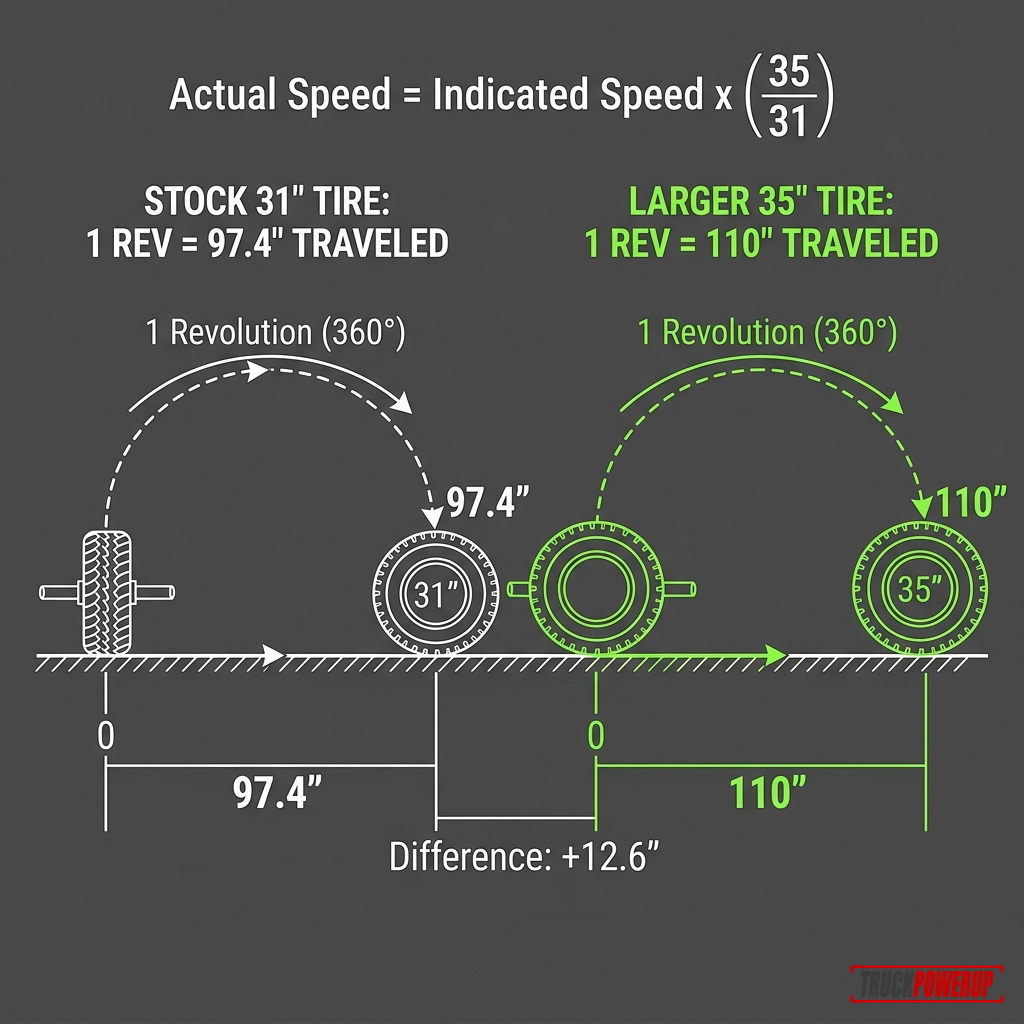
Your Ford F-150 measures vehicle speed by counting the rotations of components inside the drivetrain. A taller tire has a larger outer circumference, which means it travels farther with each rotation. Because the computer expects the factory tire circumference, it miscalculates speed and distance:
Actual Speed = Indicated Speed x (New Tire Diameter / Old Tire Diameter)For example, jumping from a factory 32.1-inch tire to a 35-inch tire means:
70 mph indicated x (35.0 / 32.1) = 76.3 mph actual speedBeyond the speedometer reading, an uncalibrated F-150 experiences several negative side effects:
- Inaccurate Odometer and Fuel Economy: The odometer undercounts miles, which artificially lowers calculated fuel economy (mpg) and messes up maintenance intervals.
- Disrupted Shift Schedules: Modern Ford transmissions rely heavily on output shaft speed (OSS) and turbine shaft speed (TSS) sensors. When the computer has incorrect tire parameters, it throws off shift timing, leading to early upshifts, transmission gear hunting, or hard shifting.
- ABS and ESC Errors: Electronic Stability Control (ESC) and anti-lock brakes calculate slip ratios. A mismatch in speed signals can cause active safety systems to trigger prematurely.
The Mechanics of Speed Sensors, Transmission Shift Logic, and Calibration Math
Modern F-150s (such as the 2015+ aluminum-body generation) distribute speed and drivetrain parameters across a high-speed CAN bus network.
1. Speed Signal Generation and Distribution
On older F-150 models (e.g., 2004–2008 11th Gen), vehicle speed was measured by a dedicated sensor located on the rear axle differential housing or the transmission tailshaft.
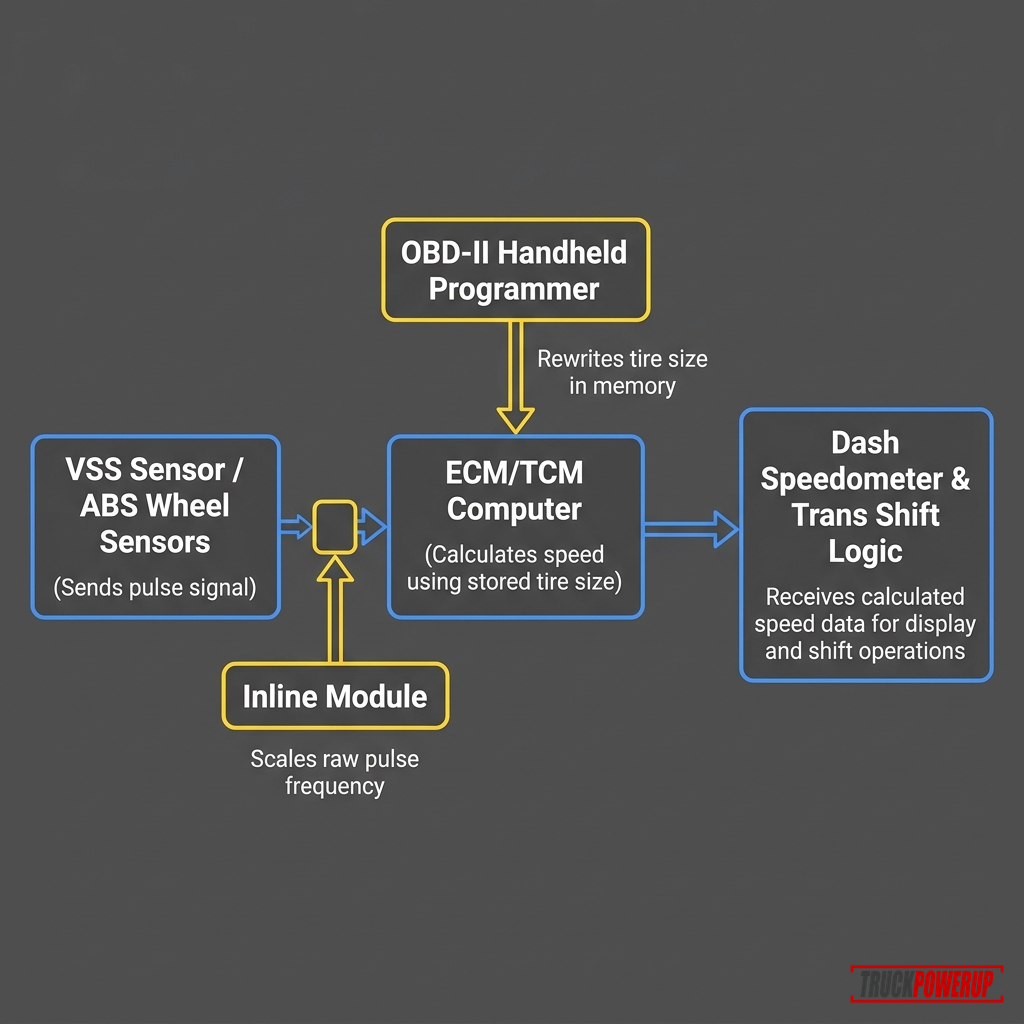
On many later F-150s, wheel-speed and tire-configuration data is shared across modules over the CAN network. Depending on year and equipment, that data can be used by:
- The Body Control Module (BCM): Stores or distributes configuration values on many Ford platforms.
- The Powertrain Control Module (PCM): Uses vehicle-configuration data such as tire/axle information.
- The Transmission Control Module (TCM): Uses speed-related inputs to help execute shifts in 6R80 and 10R80 trucks.
- The Instrument Panel Cluster (IPC): Displays the calculated vehicle speed.
2. Transmission Shift Schedules and the 10R80 Shift Logic
Ford’s 10R80 10-speed automatic transmission relies on speed and load inputs to choose gears. When you install taller tires, the wheels and driveline spin fewer times per mile at any given vehicle speed.
If the BCM is not calibrated:
- Engine Lugging (6R80 & 10R80): The truck may feel like it upshifts too soon or pulls a taller effective gear than expected, especially with heavy LT tires.
- Torque Converter Behavior: Because torque converter clutch timing uses speed-related inputs, a large tire-size mismatch can contribute to less predictable lockup behavior.
Superchips documentation warns that running uncalibrated tire profiles directly degrades automatic transmission shift points and lock-up parameters: Superchips Flashcal.
3. OBD-II vs. Inline Calibration Methods
- BCM EEPROM Modification (OBD-II): Tools write directly to the BCM’s configuration block. FORScan modifies the hexadecimal or plain English configuration data. Handheld calibrators perform the same flash process automatically.
- Speedometer Signal Interceptor (Inline): On models where module writing is locked, inline hardware blocks (like the Hypertech In-Line Speedometer Calibrator) plug in-line behind the instrument cluster. The module intercepts the speed data feed and multiplies it by a correction factor (e.g.,
1.09for a 9% upsized tire) to scale the gauge reading.
How to Measure F-150 Tire Height
Do not use the nominal size printed on the tire sidewall for calibration. A tire marked “35x12.50R20” is rarely 35.0 inches when mounted under the weight of an F-150. Entering a nominal size will leave your speedometer off by 1–3 mph.
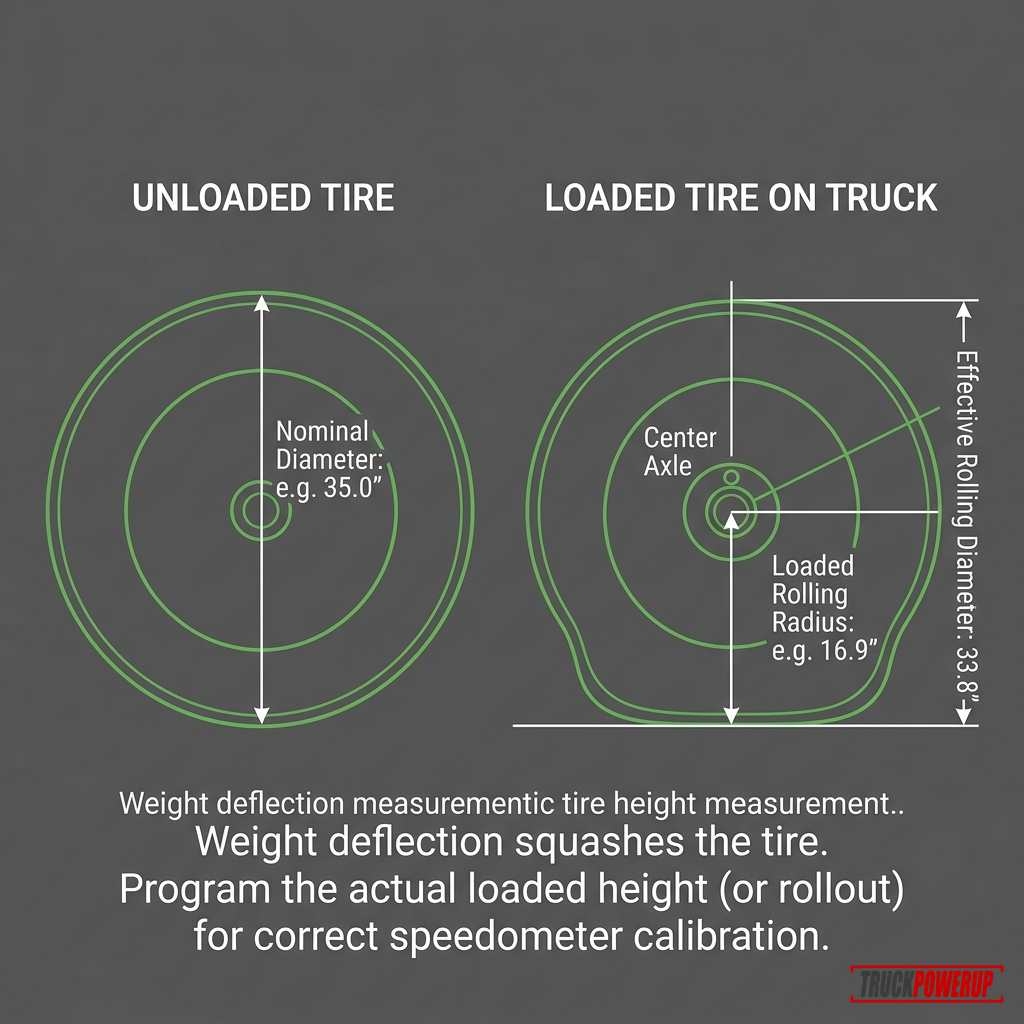
Measure the loaded rolling height:
- Park the truck on a flat concrete surface.
- Measure from the ground to the center of the wheel hub.
- Multiply this number by 2 to get your loaded rolling diameter.
- Alternatively, use the rollout method: paint a line across the tread, roll the truck forward one full tire rotation, measure the distance between the paint marks on the ground, and divide that distance by
3.1416(pi).
Method 1: The FORScan Software Method (Cost-Effective)
FORScan is diagnostic software designed specifically for Ford, Lincoln, and Mazda vehicles. It allows you to access module configuration parameters that are usually restricted to dealership tools.
What You Need:
- A PC Laptop: Running Windows (FORScan runs natively on Windows).
- FORScan Software: Download the latest version and obtain a free extended license (or paid subscription) from forscan.org.
- A High-Quality OBD-II Adapter: The officially recommended adapter is the OBDLink MX+ Bluetooth or the Vlinker FS USB adapter. Cheap OBD-II ELM327 clones often fail to read modern Ford CAN networks (MS-CAN/HS-CAN) and can corrupt modules during write operations.

OBDLink MX+ OBD2 Bluetooth Scanner
- • Gold-standard adapter for FORScan users
- • Supports both HS-CAN and MS-CAN networks
- • Bluetooth connection for PC, Android, and iOS
- • Provides fast data transfer rates to prevent write timeouts
Ford’s own OBD documentation explains why the relearn matters: on some applications, the BCM sends VIN, tire-circumference, axle-ratio, and cruise-control configuration data to the PCM over the vehicle CAN network. If new tire/axle data does not match what the PCM already stored, Ford says a P160A “Vehicle Options Reconfiguration Error” can be set until a service tool executes a learn command: Ford OBD system operation document. FORScan’s tire-size procedure describes the same practical workflow after a BdyCM tire-size change: run module initialization/relearn functions for the PCM and TCM, then clear DTCs: FORScan tire-size procedure.
Step-by-Step FORScan Calibration:
- Connect to the Truck: Plug your OBDLink MX+ into the OBD-II port, turn the truck’s ignition to ON (Engine Off), and connect FORScan on your laptop.
- Backup Modules: Before making any edits, go to the configuration tab, select the Body Control Module (BCM) (or BdyCM), and save a backup of your original “As-Built” configuration.
- Update Tire Size:
- Go to the Configuration and Programming tab (the microchip icon).
- Select Body Control Module (BdyCM) Module Configuration (the non-As-Built version, which provides a plain-English menu).
- Scroll down to Tire Circumference (or Tire Size) and double-click it.
- Enter the new tire circumference in millimeters. (To convert loaded rolling diameter to millimeters:
Diameter in inches x 25.4 x 3.14159). - Click Write to save the changes.
- Fix the Wrench Light / Clear Module-Mismatch DTCs:
- After writing the new tire size, the truck may display a wrench light or store a mismatch code such as
P160AorU0422. This occurs because the BCM tire constant no longer matches the powertrain module’s learned value. - Go to the Service Functions tab (the wrench icon in FORScan).
- Select PCM Module Relearn / TCM Module Relearn (depending on year, it might be labeled Module Initialization/Relearn or PCM/TCM Relearn).
- Run this service function and follow the on-screen prompts to cycle the ignition. This synchronizes the new tire circumference constant from the BCM into the Powertrain and Transmission modules.
- Clear all DTC diagnostic codes. If the code returns, the entered circumference may be outside the range that one of the modules will accept.
- After writing the new tire size, the truck may display a wrench light or store a mismatch code such as
Method 2: Handheld Programmers & Inline Modules (Hardware)
If you do not want to use a laptop and software, you can buy a dedicated handheld calibration tool.
Best Handheld Option: Hypertech Speedometer Calibrator
Hypertech’s handheld speedometer calibrator is a dedicated OBD-II programmer that plugs directly into your F-150’s port. It allows you to enter your exact tire size to correct the speedometer and odometer, and saves your factory stock program for easy recovery.
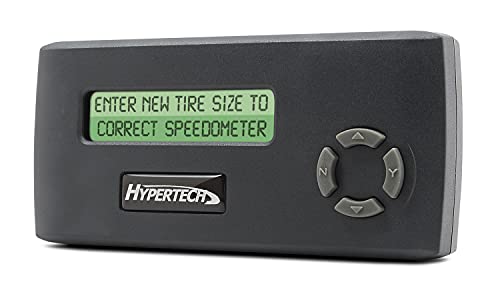
Hypertech Speedometer Calibrator
- • Dedicated speedometer and odometer calibration
- • Supports tire-size and gear-ratio correction on compatible vehicles
- • Saves factory program for easy recovery
- • Confirm exact vehicle compatibility
Best Inline Option (For Locked/Late Models): Hypertech In-Line Calibrator
For newer F-150s where OBD-II programming is restricted or if you prefer an inline hardware interceptor, the Hypertech 730125 module plugs directly behind the instrument cluster. It modifies the incoming raw speed signals before they reach the cluster display.
Hypertech In-Line Speedometer Calibrator Module
- • In-line harness design plugs directly behind instrument cluster
- • Adjusts speed signals without flashing BCM or PCM modules
- • Ideal for vehicles with locked ECUs
- • Easily programmable via USB on a PC
Can a Ford Dealer Calibrate for Bigger Tires?
A Ford dealership may be able to recalibrate your speedometer, but dealer tools are usually strongest when the tire size matches a factory-supported configuration for that model year.
For instance, if your F-150 came with smaller tires and you want to calibrate for a size Ford offered on a similar trim, the dealer may have a path. If you installed a suspension lift and 35-inch or 37-inch tires, ask the dealer with your VIN before assuming FDRS/IDS can write that exact tire value. In many lifted-truck cases, owners use FORScan or an aftermarket programmer instead.
Speedometer Error & Tire Size Calculator
Use our interactive calculator below to compare your stock tire size to your new upsized tires. This will show you your exact speed discrepancy and percent error.
Interactive Tool
Ford F-150 Speedometer Error & Tire Calculator
Compare tire sizes to calculate speedometer error, height differences, and look up recommended tire pressure adjustments when switching from passenger (P-metric) to light truck (LT) tires.
Speedometer Impact
Speedometer Reads Slow
When your speedometer reads 60 MPH, your truck's actual speed is 62.1 MPH.
You can also use this manual formula to calculate your speed error percentage:
Error Percentage = ((New Tire Diameter / Old Tire Diameter) - 1) x 100For example, if you replace stock 32.1-inch tires (275/65R18) with 34.6-inch tires (285/75R18):
((34.6 / 32.1) - 1) x 100 = 7.78% Speedometer ErrorAt a displayed 70 mph, you are actually traveling:
70 mph x 1.0778 = 75.4 mph actual speedCommon Installation & Programming Mistakes
- Using Unverified OBD-II Adapters: Cheap ELM327 wireless OBD-II adapters can lose connection mid-write. Always use a recommended adapter like the OBDLink MX+ or Vlinker FS.
- Skipping the PCM Relearn in FORScan: Many owners write the new tire size to the BCM and think the job is done. Without running the PCM/TCM relearn service function, the truck will display a wrench light on the cluster.
- Entering the Nominal Tires Size: Typing “35” for a 35-inch tire when the loaded height is only 34.2 inches will leave the speedometer slightly off.
- Stacking Calibrations: If you already have a performance engine tune (such as 5-Star or Cobb), do not plug in a speedometer calibrator. Adjust the tire size directly within the custom tuning software to avoid corrupting modules.
FAQ
Does FORScan create warranty risk?
It can. Changing module configuration does not mean every unrelated repair is automatically denied, but it can create questions if a drivability, module, transmission, or electrical problem shows up later. Dealers can also overwrite custom settings during service.
Will larger tires affect my F-150’s transmission shift points?
Yes. Uncalibrated larger tires cause the transmission module to read output shaft speeds that are lower than actual road speeds, causing early upshifting, gear hunting, and engine lugging.
What is the wrench light after FORScan tire calibration?
The wrench light is triggered by a module mismatch between the BCM (which has the new tire size) and the PCM/TCM (which still expects the old tire size). Running the “PCM Module Relearn” service function resolves this mismatch.
Can I calibrate my speedometer for 35s without a programmer?
No. You must either rewrite the tire size parameters in the truck’s modules using a computer (FORScan) or use a handheld device/inline signal module.
Related Fitment Guides
Not sure whether recalibrating is enough or you also need new gears? Start with larger tires: recalibrate, regear, or both.
- How to Calibrate a Ram Speedometer for Larger Tires
- How to calibrate a Chevy speedometer for larger tires
- How to choose the best tire for your pickup truck (Tire Basics)
- Best truck mud tires for daily driving and off-road grip
- Best snow chains for 4x4 trucks
Sources Checked
- FORScan official documentation and software releases
- Ford OBD system operation document
- FORScan tire-size adjustment procedure
- Superchips Flashcal user guides and vehicle coverage lists
- Hypertech Speedometer Calibrator manual and specifications
- Rough Country Speedometer Calibrator documentation
More Featured Guides

How to Calibrate a Ram Speedometer for Larger Tires
Upsizing tires throws off your Ram truck's speedometer, odometer, and transmission shift points. Learn how to calibrate using AlfaOBD, Tazer RAM, or handheld programmers.
Read Guide
How to Calibrate a Chevy Speedometer for Larger Tires
Larger tires make many Chevy truck speedometers read low. Learn how to calculate the error, choose a calibration method, and verify the fix.
Read Guide
Gear Ratios and Regearing Larger Tires: The Truck Owner's Math Guide
Learn when larger pickup tires need regearing, how effective axle ratio changes, what ratio restores stock feel, and when speedometer calibration is enough.
Read GuideKelley Crush
Kelley is a mechanical engineer and a truck enthusiast. He's currently an F-250 guy, but he promises to respect any well-equipped and properly utilized truck.